
How to Upscale and Export Midjourney Images in Ultra-High Resolution
Generating a beautiful image in Midjourney is only half the battle. If you want to use your AI art for print media, website banners, or professional presentations, you must know how to upscale it without losing fine textures. Midjourney offers direct, built-in non-destructive upscalers right inside the Discord interface.
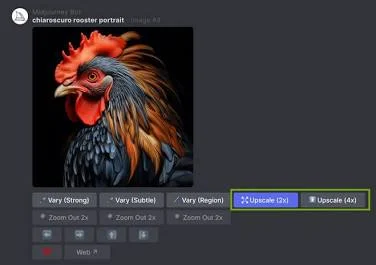
How to Apply the Upscalers
When your grid of 4 images finishes rendering, follow these steps to maximize their resolution:
- Step 1: Select the image you like by clicking U1, U2, U3, or U4 to separate it from the grid.
- Step 2: Locate the upscale buttons beneath the single image. You will see Upscale (Subtle) and Upscale (Creative).
- Step 3: Choose Subtle if you want to preserve the exact details. Choose Creative if you want the AI to add realistic micro-details (like skin pores or fabric textures) while increasing the size.
- Step 4: Once completed, click the image, select “Open in Browser,” and save it to your device to get the uncompressed PNG format.
