
How to Use Mistral Le Chat Canvas to Write and Edit Documents
Le Chat's Canvas mode keeps a document beside the chat so you can revise with prompts. A practical workflow for drafting and editing without copy-paste…
 iaifeed.com

Browser-based design tool with AI writing, image generation and one-click resizing
Canva is a browser-based design app with AI features built into the editor. You get text generation (Magic Write), image and video generation (Magic Media), background removal, and one-click resizing. Free plan, 5GB storage, Pro around $15/month.
Canva is an Australian company (Canva Pty Ltd, founded 2013, Sydney) that runs entirely in a browser. There is no install, and the desktop apps are thin wrappers around the same web editor. The pitch is not AI-first: it is a template library of roughly 600,000 layouts with AI helpers bolted onto the parts where people usually get stuck — the copy, the image, the format.
That matters if you have used a pure generator like Midjourney. Canva will not hand you a stunning image from one prompt. It will let you assemble a 1080×1350 Instagram post, rewrite the caption in a friendlier tone, swap the hero photo for an AI-generated one, and export all of it in four minutes. Different job.
Magic Write sits inside the text box. Type a prompt, and you get draft copy: a caption, a bullet list, a slide outline. It runs on Canva’s own models plus partner models, and the free plan caps you at 50 lifetime uses of Magic Write. That cap is the single most common complaint in Canva forums, and it is not obvious until you hit it.
Magic Media generates images and short video clips from a prompt. On the free plan you get a small monthly allowance of credits; Pro gives more. Output quality is mid-tier. Fine for decorative backgrounds and abstract textures. Not fine for photorealistic faces or product shots — it drifts badly on hands and text rendering.
Magic Resize is the feature that quietly saves the most time. Take a square post and produce it in 9 other formats — story, banner, Pinterest pin, A4 flyer — with the layout auto-reflowed. It is a Pro feature, and it occasionally scrambles layered designs, so always eyeball the resized output.
Background Remover and Magic Eraser are one-click and genuinely good. Beat-out quality on hair edges is weaker than Photoroom or Bria, but for slides and thumbnails it is fine.
| Plan | Price | Key AI limits |
|---|---|---|
| Free | $0 | 5GB storage, 50 lifetime Magic Write uses, limited Magic Media credits |
| Pro | ~$15/mo per person (annual) | 1TB storage, unlimited Magic Write, Magic Resize, brand kits |
| Teams | ~$10/mo per person, min 3 seats | Approvals, brand controls, shared folders |
| Enterprise | Quote | SSO, admin controls, brand governance |
Canva uses “per person” licensing, not seats, and the annual Pro price is roughly 40% below the monthly rate. Nonprofits and educators get Pro free after verification — worth 10 minutes of paperwork if you qualify.
Export quality is the honest weak spot. You cannot export true vector SVG on most free templates, and PDFs from Canva routinely fail print-shop preflight checks because of flattened layers and RGB color. If you are handing files to a commercial printer, either upgrade the export path or move the file to Illustrator.
The AI also has no memory. Magic Write does not learn your tone across projects the way Jasper or Copy.ai brand voices do. You re-prompt every time. For a solo creator that is tolerable. For a team producing 40 posts a week with a fixed voice, it is friction.
Use it if you are a marketer, founder, teacher or community manager producing a steady stream of social graphics, decks and one-pagers with zero design team. The template floor is high, so nothing you make looks broken.
Skip it if you need print-ready CMYK output, if you need pixel-level illustration control, or if your brand system requires strict typography — Canva’s font handling and kerning controls are shallow compared with Figma or Affinity. See our Figma AI page for that path.

Face search engine that finds where a photo appears online, sold as a personal privacy tool

Custom-trained image model platform for studios that need consistent characters and brand styles

Diagramming suite where AI drafts the flowchart and links live to your data

Prompt-first image canvas for designers, with brand styles, inpainting and a free daily credit allowance

Infinite whiteboard with AI that clusters and summarizes sticky notes

Hand-drawn style whiteboard with AI diagram generation
Le Chat's Canvas mode keeps a document beside the chat so you can revise with prompts. A practical workflow for drafting and editing without copy-paste…

Flowith is an AI workspace built around a non-linear canvas where you branch, compare, and combine AI responses. This guide shows you how to create…
Concept art iteration traditionally involves sketching, reviewing, refining, and repeating — a cycle that can consume hours per design. Leonardo AI‘s Realtime Canvas collapses this…
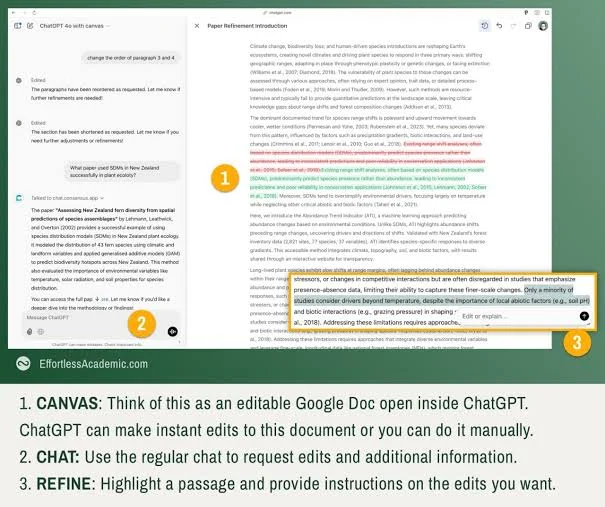
ChatGPT Canvas introduces a dedicated writing workspace side-by-side with your chat. This interface allows you to edit text directly, highlight specific paragraphs, and ask the…

Editing preserves what a re-roll destroys. Here is how to mask tightly for inpainting, handle hair and glass cutouts, and chain three steps through the…

Generate once at 1080x1920, then crop three ways instead of re-running each channel. Here are the sizes, the branding settings that keep a catalog consistent,…